The Layout Problem Starts Before Translation Begins
A scanned PDF can look straightforward on the surface, but under the hood, it often hides tricky elements—like image-only text, faded handwritten amendments, overlapping stamps, or dense tables that standard OCR tools struggle to interpret accurately. Because of these hidden quirks, translating a scanned document is rarely a simple case of extracting and replacing text.
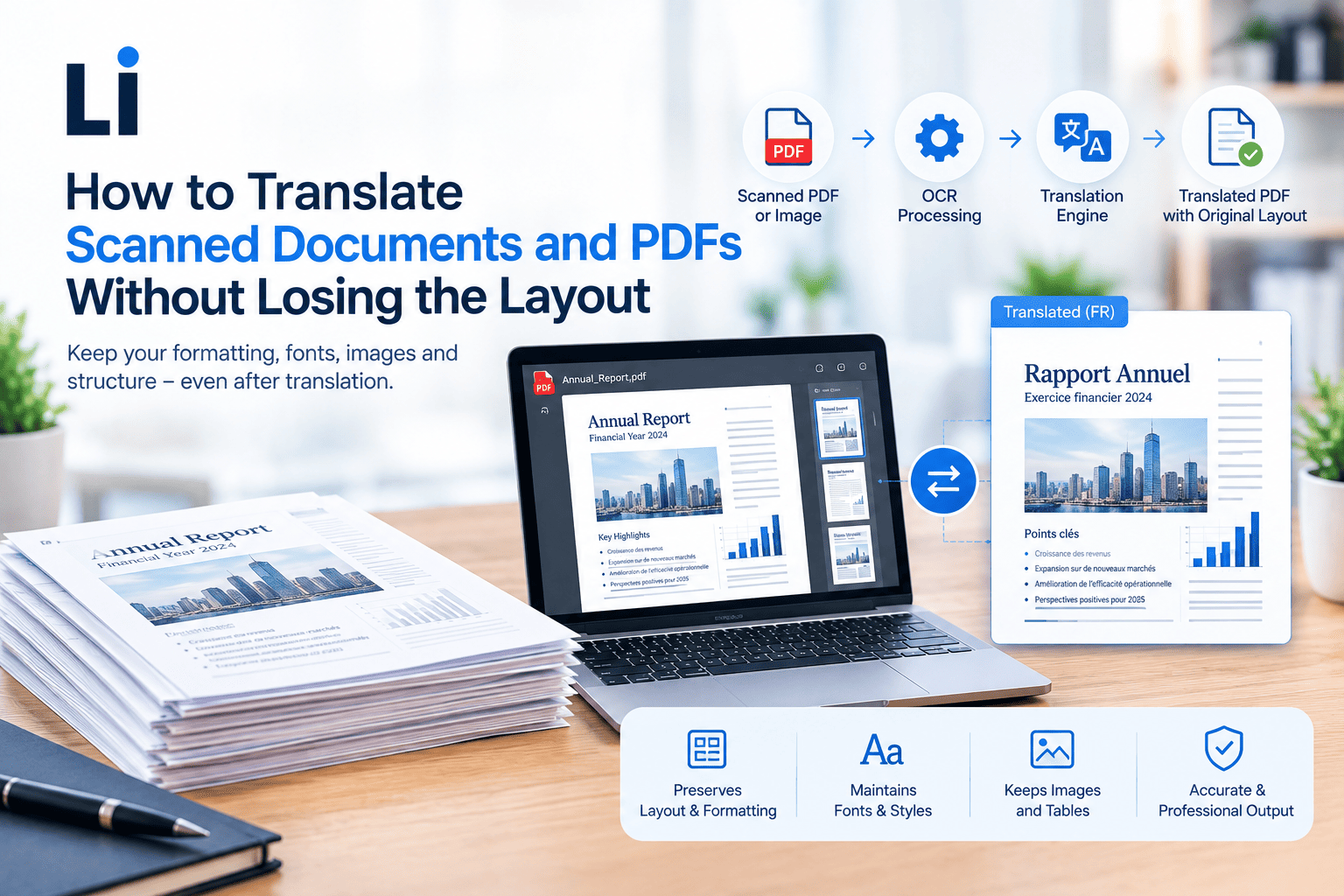
To do it right, PDF document translation demands a careful initial file assessment, thorough OCR verification, specialised translation, manual layout reconstruction, and rigorous final quality checks. This human-driven approach ensures the final document retains its original structure, visual hierarchy, and overall readability without losing critical context.
Is the PDF Searchable or Scanned?
A searchable PDF contains selectable text, while a scanned PDF is usually an image of the original document. A simple way to check is to try highlighting a sentence or using the search function. If you can’t select the text, the file will usually need OCR before translation begins.
Businesses that translate scanned documents should also remember that one PDF may contain both searchable and image-only pages, so every page should be assessed individually.
A common mistake is assuming that every page in a PDF has the same structure. Some files contain both searchable text pages and image-only scanned pages, so each page should be assessed before translation begins.
What Is the Workflow for Translating a Scanned PDF?
Assess the Source File
Start by checking image quality, page orientation, missing pages, password protection and the source language. Identify tables, columns, stamps, handwritten notes and text embedded within images. If important information is blurred or incomplete, request a clearer scan before work begins.
Extract and Verify the Text with OCR
OCR converts image-based text into a searchable or editable format. However, OCR is only the first step. A human must always check low-confidence characters, names, dates, numbers and specialist terminology before translation. Effective OCR document translation combines technology with careful verification.
Translate and Reinsert the Content
Once verified, the extracted text should be assigned to a linguist with expertise in the relevant subject area, whether legal, medical, financial or technical. The translated content is then returned to the correct tables, captions, fields and page positions. This process supports accurate scanned PDF translation while ensuring PDF document translation remains clear and usable.
How Should Tables, Forms, Stamps and Handwritten Notes Be Handled?
Tables and Forms
Tables and forms require more attention than ordinary text because the information has to stay in the right place and be translated correctly. Field labels, numbering and the relationship between rows and columns should all be preserved so the document remains easy to read and use. It’s also worth checking that the translated text still fits neatly within the available space. Even a small formatting change can move information into the wrong row or field, creating confusion for the reader.
Stamps, Seals and Handwriting
Scanned documents often include official stamps, seals or handwritten notes alongside the main text. If these elements are clear and relevant, they should be translated carefully. If they’re difficult to read, it’s better to indicate “[illegible handwriting]” than to guess what they say. Before the project begins, it’s also a good idea to confirm whether these elements need to be translated at all, as the requirements can vary depending on how the document will be used.
Use Desktop Publishing to Rebuild the Original Layout
Translation often changes text length, affecting tables, headings and page flow. Right-to-left languages, unavailable fonts and translated diagrams may also require adjustments. Document formatting translation uses desktop publishing to refine spacing, alignment and pagination before comparing the translated file against the source to check headings, footers, page numbers and references.
What Should Be Confirmed Before Work Begins?
Before the project starts, it’s worth agreeing on exactly what you need the finished document to look like. Do you need an editable Word file, a searchable PDF, a bilingual version or a final PDF that closely matches the original layout? It’s also helpful to confirm the target language, how the document will be used, whether certification is required and when you need it delivered. If the document contains confidential or sensitive information, discuss secure file handling with your translation provider rather than relying on public file-conversion tools to translate PDF files.
How Does LingArch Handle Scanned and Layout-Sensitive Documents?
File Assessment and Workflow Planning
Every scanned document is different, so LingArch starts by reviewing the file before any translation begins. The team checks document quality, language pair, formatting complexity, and the required output type, while also identifying any OCR limitations, unclear pages, or layout challenges that could affect the project. For larger or time-sensitive assignments, the workflow can also be planned in stages to help keep the project moving smoothly without compromising quality.
Specialist Translation and Independent Review
LingArch assigns linguists according to the document’s language, industry and intended use. Terminology checks, independent review and final file inspection help maintain consistency across projects delivered in more than 120 languages through a network of over 1,500 linguists.
Relevant Quality Standards
LingArch’s document translation services follow recognised processes, including ISO 17100 for translation workflows, ISO 9001 for quality management and ISO/IEC 27001 for secure handling of sensitive information, with ISO 20771 relevant to legal translation projects and ISO 18587 relevant where full human post-editing of machine-translated content is required. These PDF document translation services combine structured workflows with human expertise.
Scanned PDFs for Personal and Certified Documents
If you’re translating birth certificates, passports, marriage certificates or academic records, submit complete, high-quality scans showing all stamps, seals and handwritten entries. Also confirm whether certified, notarised or layout-matched output is required.
Scanned Document Translation in Practice
When a law firm faced a tight German patent deadline with complex charts and tables, LingArch translated the text and rebuilt every diagram, delivering the patent days ahead of schedule.
Preserve Meaning, Structure and Usability
Successful scanned-document projects protect more than the wording. They preserve the document’s structure, readability and practical use. By assessing the file, verifying OCR output, using specialist translators, rebuilding the layout and completing final quality checks, organisations can produce reliable translations that remain fit for purpose.
Whether you need scanned contracts, technical reports, regulatory files or personal certificates translated, LingArch can assess your files and recommend the right workflow before work begins. Email [email protected], call +44 (0)208 004 7800 to discuss your documents.
Frequently Asked Questions
1. Can a scanned PDF be translated directly?
Usually not. OCR is normally required to extract image-based text before professional translation and formatting can begin.
2. Will the translated PDF look exactly like the original?
In many cases, the layout can be closely reproduced, although font availability, text expansion and source quality may require small adjustments.
3. Can handwritten notes and stamps be translated?
Yes, where they are readable and relevant. Unclear content should be marked rather than guessed.
4. Can I receive an editable translated document?
Yes, if this is agreed before work begins. Depending on the project, Word files, searchable PDFs and other editable formats may be available.